
Formatta Filler Download Instructions
Formatta Installation
- Click on this link: setup (.exe)
- Depending on the internet browser you are using, clicking the Formatta Filler.exe link above will either open a ‘Save-as’ window (save this file to your PC and once the download is complete, click to open) or give you the option to ‘Run’ (click run to begin the installer).
- Installer ‘Welcome’ screen will be displayed. Click ‘Next’.
- Click ‘I Accept’. Click ‘Next’. Click ‘Next’. Click ‘Next’ a final time to begin the install.
- After the installation is complete, a ‘Registration Wizard’ screen will be displayed. Click ‘Skip’.
- Remove the check mark next to ‘Launch Formatta Filler with ReadMe.pff’.
- Click ‘Finish’.
Changing Default Program Used with .pff Files
Note: If .pff forms do not automatically open with Formatta Filler after installation is complete you will have to change the program this file-type is associated with. This can be done two ways:
If you have a .pff file saved on your PC:
- Right-mouse click on the .pff file and select ‘Properties’.
- From the ‘General’ tab, click ‘Change’ located next to ‘Opens with:’.
- Click ‘Browse’.
- Navigate to: C -> Program Files (x86) -> Formatta -> Filler.exe
- Click ‘Filler.exe’ and click ‘Open’.
- Click ‘Ok’.
- Click ‘Ok’.
- Formatta Filler will now be the default file program for .pff files.
Change the program association using the Control Panel:
- Click Start Menu Button -> Control Panel -> Programs.
- Under ‘Default Programs’, click ‘Make a file type always open in a specific program’.

- Scroll down the list of file-types and locate .pff Filler Document.
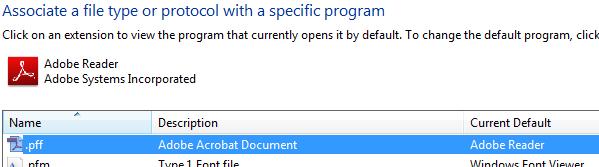
- Double-click on .pff or left-mouse click and select ‘Change program…’ at the top of the window.
- Formatta Filler should be listed under ‘Recommended Programs’. Select Formatta Filler and press ‘OK’. Formatta Filler will now be the default file program for .pff files.
- Note: If you do not see Formatta listed under ‘Recommended Programs’, click ‘Browse’ and navigate to the location in which it was installed on your PC. Select Filler.exe, click ‘Open’, click ‘OK’.