
Version 8.4.4
- Version 8.4.4
- Date Installed: May 14, 2026
About this Release
This release contains:
- Performance Improvements
- Accessibility Improvements
- Bug Fixes
- Quality of Life improvements for T4 users
- Also includes some work behind the scenes to prepare the platform for features in future releases
Click here for a full list of changes.
Accessibility Improvements
Color contrast fixed for code blocks and alerts within the platform.
Bug Fixes
- Improved the behavior of text inputs.
- When editing content, text inputs were often presented much larger than they needed to be. Textareas in content now display as standard inputs and their height automatically grows as required to fit the content inside them.
- The Keywords Selector element has had a makeover.
- The keywords selector element is a powerful element that's really useful when used in conjunction with Keywords Search navigation objects. They allow for advanced queries including AND/OR logic. Previously, the user experience when working with this element wasn't as clear as it should have been. We've now redesigned how this element is presented making it much easier to use.
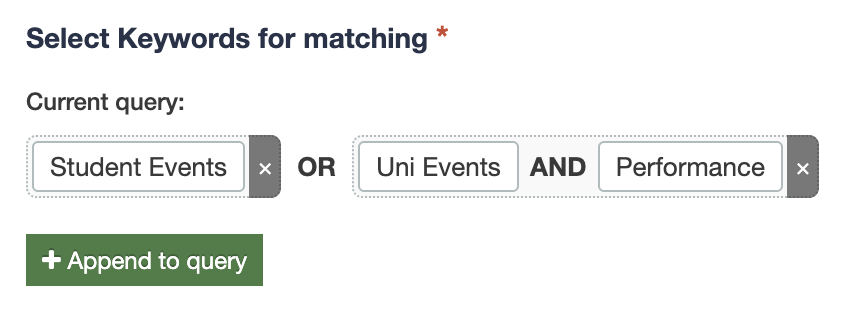
- The keywords selector element is a powerful element that's really useful when used in conjunction with Keywords Search navigation objects. They allow for advanced queries including AND/OR logic. Previously, the user experience when working with this element wasn't as clear as it should have been. We've now redesigned how this element is presented making it much easier to use.
- Fixed column sorting on content, media, and layout history. Previously attempting to sort by a date resulted in alphabetical sort which wasn't very useful... Now when you sort by Last Modified Date it works the way you expect it to.
Spanish language support
Spanish-speaking users can now switch the entire Terminalfour interface to Spanish. This makes the platform accessible to a much wider audience and removes the language barrier for institutions with Spanish-speaking staff.
To change your user's interface language to Spanish, you can edit your profile (via the menu on the top right of the screen) and select español from the new "User Interface Language" option.